How to Stop Eligibility and Authorization Denials Before the Visit
November 11, 2026

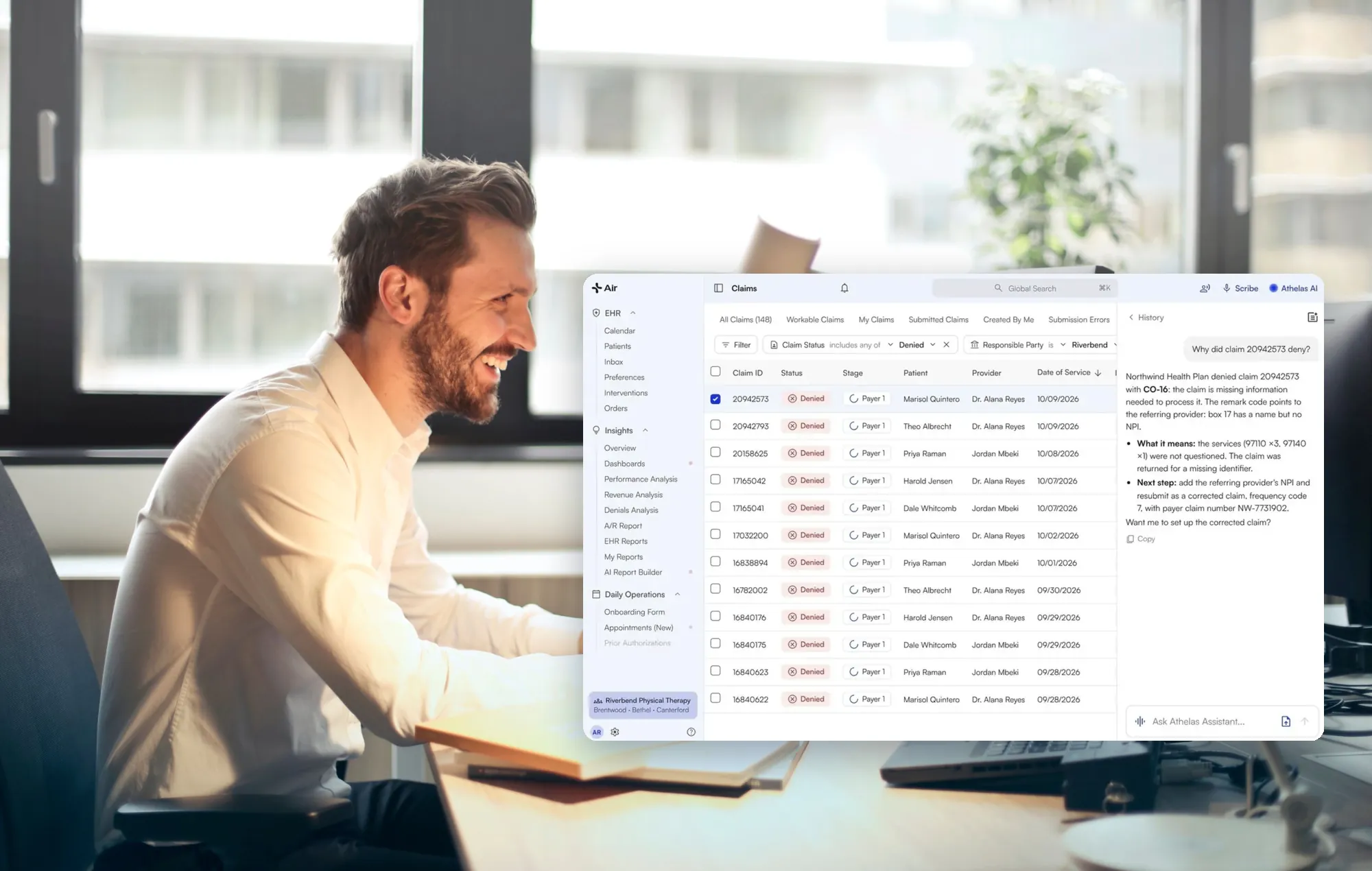
Athelas solves this problem two ways. Athelas Air is an AI-native EHR and practice management suite with billing built in. Your front desk and billers check eligibility, track authorizations and set claim rules in the same system as the schedule and the chart. Athelas RCM is a managed billing service. Our team and software do the billing work for you: claims, coverage checks, payment posting, denials, follow-up and patient statements. You can add it onto Athelas Air or use it with the EHR you already have. Both run on the same Athelas billing platform.
Key takeaways
- Check three times, not once. Verify at scheduling, the day before, and at check-in, because coverage and authorizations change.
- Track authorizations by end date and visit count. Both can run out, and nobody notices until after the visit.
- Name the source you trust. When portals, phone reps and denial notices disagree, record which one you follow and when you re-run it.
- Let a rule hold the claim. A billing rule can stop a claim from going out until the authorization is on file.
- Decide who does the work. With Athelas Air, your team runs it all in one EHR and practice management system. With Athelas RCM, our billing team does it, on Air or on your current EHR.
In our recorded revenue-cycle calls, 45% of the practices we analyzed mentioned eligibility and benefits, and 30% mentioned prior authorizations. These are call observations from practices that spoke with us, not a representative survey.
How can a small medical practice stop checking insurance eligibility by hand across payer portals and phone calls?
Automate the checks, then decide who owns the follow-up. There are two good setups:
- You want one system and your own team: Athelas Air. Scheduling, eligibility, authorization tracking, charting and billing live in one EHR and practice management suite. Eligibility runs automatically before each appointment, and a signed note becomes a billable charge with nothing to sync.
- You want the billing work done for you: Athelas RCM. Add it onto Athelas Air, or keep your current EHR. No EHR switch is required.
Either way, you keep credentialing and obtaining prior authorizations. Athelas tracks them, and billing rules hold or correct claims. If you are comparing vendors, use the table below.
Why do eligibility and authorization denials happen?
Most of them start before the patient arrives. In 22% of the practices we analyzed on recorded revenue-cycle calls, eligibility was checked by hand, one payer portal at a time. In 7%, missed or expired prior authorizations were not found until several visits later.
A typical case: a physical therapy clinic's authorization has a visit count and an end date. An assistant checks the count but not the date, and five visits are booked past it. Staff find out after the fact.
Other patterns we hear:
- Insurance details outdated or missing on accounts: mentioned in 10% of analyzed practices.
- Eligibility results without copay, benefit or coinsurance detail: mentioned in 9%.
- Conflicting answers across calls or portals: mentioned in 7%.
- Coverage or network status found only after denial: mentioned in 6%.
What should you verify before each visit?
Use this numbered checklist at three points: scheduling, the day before, and check-in.
- At scheduling, capture the card and ID. Collect the front and back of the insurance card and the exact name on it. Compare it with the member ID the payer has on file. Changed member IDs and Medicare numbers cause rejections even when the card was sent.
- Run the first eligibility check. Record the result: Active, Inactive, Inconclusive or another status. Athelas documentation lists Active, Inactive and Inconclusive as the most common results, plus Not Covered, Pending, None, Self Pay and Site Responsibility (Athelas docs, 2026). In Athelas, an automatic check runs once for each upcoming appointment, 7 days before the date of service by default, or at the lead time your practice sets.
- Match the service type to the visit. A check against the wrong service type can return the wrong copay. Athelas checks are service-type based, and you can map appointments to service types such as office visits, physical therapy or mental health, or override the service type on a live check.
- Confirm network status. Coverage or network problems found after denial cost you the claim. Flag out-of-network results while the patient can still choose.
- Check whether the service needs authorization. If yes, ask for the effective date, expiration date and authorized visits or units. Do not book past the end date.
- Enter the authorization with both limits. Record the number, the category (pre-certification or referral), the insurance it is tied to, the dates and the tracked visits or units. Track by visit count or CPT code units.
- Re-run eligibility the day before. Eligibility can be run only up to 14 days ahead, so appointments booked further out need a check closer to the date. Re-run any check if the patient's coverage may have changed.
- At check-in, compare the three numbers. Look at remaining visits, the authorization end date and the eligibility status. If any one is off, stop before the visit, not after the claim. In Athelas, the appointments list flags Eligibility, Copay, Prior Auth and Visit Limits alerts before the patient arrives. On Athelas Air, kiosk check-in can run a live eligibility check as the patient checks in.
- Review the claim before submission. Preview which rules would apply to the claim and fix problems before it goes out.
What do you do when payer information conflicts?
Name one source of truth for each question and write down the time you checked it. Use this decision table.
In 7% of analyzed practices, eligibility and copay answers conflicted across calls or portals.
What if a claim denies anyway?
Work it by cause, then change the process so it does not repeat. In 57% of analyzed practices, denials and appeals came up on calls.
- Read the denial reason. Separate member ID, coverage, authorization and visit limit denials.
- Fix the source record. An orthopedics biller on a ModMed EHR described member ID errors that kept appearing on claims even after the office sent the insurance cards and opened a support ticket. If billing runs alongside a separate EHR, fix insurance details in the EHR so the next sync carries the correction.
- Rebill. One rehab therapy customer reported that the system rebilled 3 Medicare claims after a subscriber ID fix. This is customer-reported, not a guaranteed result.
- Add a rule. Athelas's billing rules engine adds a rule after a denial so the same denial does not repeat.
- Watch therapy caps. For CY 2026 the Medicare KX modifier threshold is $2,480 for PT and SLP services combined, and $2,480 for OT services. Claims over the threshold without the KX modifier are denied (CMS, Therapy Services, as of 2026). Read the CMS therapy services page.
How do Athelas Air and Athelas RCM handle eligibility and authorization tracking?
Both use the same Athelas billing platform. The difference is who does the work and whether you change EHRs.
What the documentation shows in the Athelas billing platform (used by both):
- Automatic checks: eligibility runs once for each upcoming appointment, 7 days before the date of service by default, across primary, secondary and tertiary coverage. Staff can re-run it anytime.
- Eligibility sources: checks run through multiple sources, including Availity, Waystar, UHC, CHC, BCBS and Infinx, depending on the payer.
- Benefit detail: checks are service-type based. Suggested Charges show the expected copay, coinsurance and deductible per appointment, calculated from live eligibility plus your own collection rules.
- Visit limits: supported for select payers as part of the eligibility response, not as a standalone offering.
- Authorization tracking: an authorization list you can filter by patient or expiry date and sort by remaining visits or units.
- Alerts: usage is tracked against the authorized visits, with alerts as it runs low.
- Eligibility report: the latest results for all patients, grouped by insurance company and priority.
- Rules engine: you can see which rules were applied to a claim, preview rules before submission and review rule triggers when one fails.
For payers that pay only with an authorization on file, a block rule can hold the claim until it is applied. Ask the team to scope it for your payers.
How does this compare with Waystar?
Vendor details as of October 30, 2026, from each vendor's own pages.
Book a demo for Athelas Air and Athelas RCM pricing.
What results have practices seen with Athelas?
These figures come from published Athelas case studies, as of 2026. Each is one practice's result.
- Cape Cod Rehab (physical therapy; Athelas Air, Athelas RCM and Ambient AI): 0.1% denial rate, compared to a 5 to 10% industry standard; 96% first-pass acceptance rate. Read the case study.
- Farnsworth Orthopedic Physical Therapy (Athelas RCM and Ambient AI): 91% of claims require no manual intervention; less than 1% of denials are unworked. Read the case study.
- Buffalo Rehab Group (13 locations; Athelas RCM and Ambient AI): denials dropped from 3% to 1%. Read the case study.
- Oxford Physical Therapy Centers (11 locations; Athelas Air, Athelas RCM and Ambient AI): about 0.5% final denial rate after resubmission and appeal; about 97% first-pass claim rate. Read the case study.
Two customers reported more on calls. A rehab therapy customer said upfront estimates moved to about 98 to 99 percent accuracy from about 90 percent. A primary care customer said about 280 automation rules brought denials to about 5.5 to 6 percent against a 2 percent target. Both are customer-reported.
Checklist: questions to ask any vendor
- How far ahead do checks run, and how often are they repeated?
- Which payers return copay, deductible and visit-limit detail?
- Can a rule hold a claim until an authorization is applied?
- Who does the work, your staff or theirs?
- Is it one system, or a tool added onto your EHR?
- Does it work with your current EHR?
Your next step:
- Want one system your team runs? See Athelas Air and book time with our team.
- Want the billing done for you? See how Athelas RCM works with your EHR and get a free financial health analysis.
Frequently asked questions
What is the difference between Athelas Air and Athelas RCM?
Athelas Air is an AI-native EHR and practice management suite with billing built in, so your own team runs scheduling, eligibility, authorization tracking, charting and claims in one system. Athelas RCM is a managed billing service: our team does the billing work for you. You can add Athelas RCM onto Athelas Air or use it with your current EHR.
Does Athelas check eligibility before every visit?
Yes. An automatic check runs once for each upcoming appointment, 7 days before the date of service by default, or at the lead time your practice sets. Staff can re-run it anytime. Eligibility can be run only for appointments up to 14 days ahead. A payer that cannot be reached through the clearinghouse needs a phone check.
Can Athelas track visit limits and authorization expirations?
Yes. You enter the authorized visits or units and the effective and expiration dates, and usage is tracked against the limit with alerts as it runs low. Eligibility-based visit limits are supported for select payers.
Do I need to switch EHRs?
Not for Athelas RCM. It works alongside your current EHR, and integration depth varies by EHR. Athelas Air replaces your EHR and practice management system. Migrations can be done in 30 to 60 days based on your practice's complexity; book time with our team to plan yours.
What should I do when eligibility results don't show copays or deductibles?
Re-run the check with the right service type, since checks are service-type based. If detail is still missing, call the payer, record the answer, and collect the estimate before the visit.
Who handles prior authorizations with Athelas?
Your practice keeps obtaining prior authorizations, with Athelas Air or Athelas RCM. Athelas tracks them, and billing rules can hold claims until an authorization is on file.
What does Athelas cost?
Athelas Air is priced per provider, with EHR, practice management, billing software, Ambient AI, Athelas Assistant, clearinghouse and portal in one price. Athelas RCM is a separate service, priced separately. Book a demo for pricing scoped to your provider count, specialty and current setup.
Sources
- Athelas docs: How to Run an Eligibility Check
- Athelas docs: The Insights Appointments Page
- Athelas docs: Prepare for the Appointment (Air)
- Athelas docs: Practice Manager overview
- Athelas docs: Pre-Visit & Check-In
- Athelas docs: Insights Prior Authorization
- Athelas docs: Patient Eligibility Report
- Athelas docs: The Billing Rules Engine
- Athelas docs: Add/edit Patient's Prior Authorization
- CMS: Therapy Services
- Waystar
- Waystar: physician and specialty practices
- Waystar: billing services
- Cape Cod Rehab case study
- Farnsworth case study
- Buffalo Rehab Group case study
- Oxford case study
- Athelas Air
- Athelas RCM