for Practices on WebPT

Three days on this EHR, and you won't want to go back.

We migrate your WebPT data to Air, your providers run their normal schedule, and Ambient AI drafts and reviews every note. No disruption. Just results. Then: you decide.

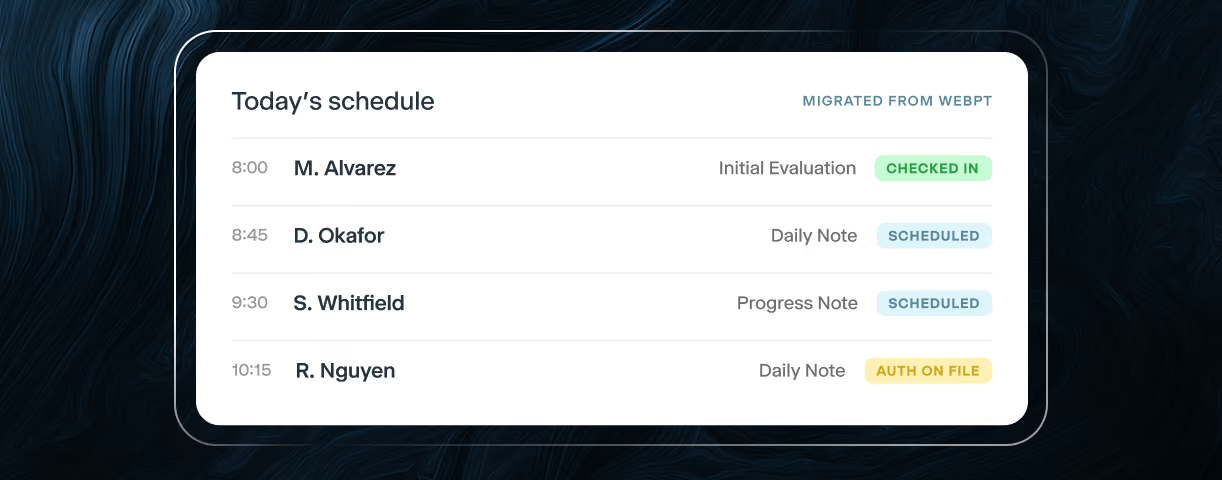
Calendar view of a healthcare scheduling dashboard showing providers’ daily appointments, patient visits, and appointment statuses across time slots.

3 days

ALL YOU'LL NEED ON AIR

5 days

MIRGATION TO GO-LIVE

1:1

WEBPT → AIR MAPPING

0

RECORDS RE-TYPED

the problem

WebPT runs your schedule. It also runs your evenings.

You know the costs of WebPT: provider burnout, front desk turnover, and clinical hours that never get billed.

Documentation after hours

Every note is typed by hand. That means the last chart of the day gets finished at the kitchen table.

Clicks instead of care

Routine tasks take a dozen clicks. Your staff is fighting software while patients wait.

Your data, out of reach

Answers live in support tickets. Simple questions about your own practice shouldn't take  days to answer.

THE PILOT

Not a demo. Your practice, running on Air.

Today’s schedule screen showing four patient appointments with visit types and status labels such as checked in, scheduled, and authorization on file.

DAY ONE

Log in and skip five years ahead.

Your schedule is populated, including next week’s visits. Every patient opens with their demographics, insurance, prior authorizations, and chart notes already in place. The questions that used to mean a report export now take one search. It's your practice, exactly as it is today, inside the EHR you wish you had.
EVERY VISIT

The note is ready before the patient returns to the front desk.

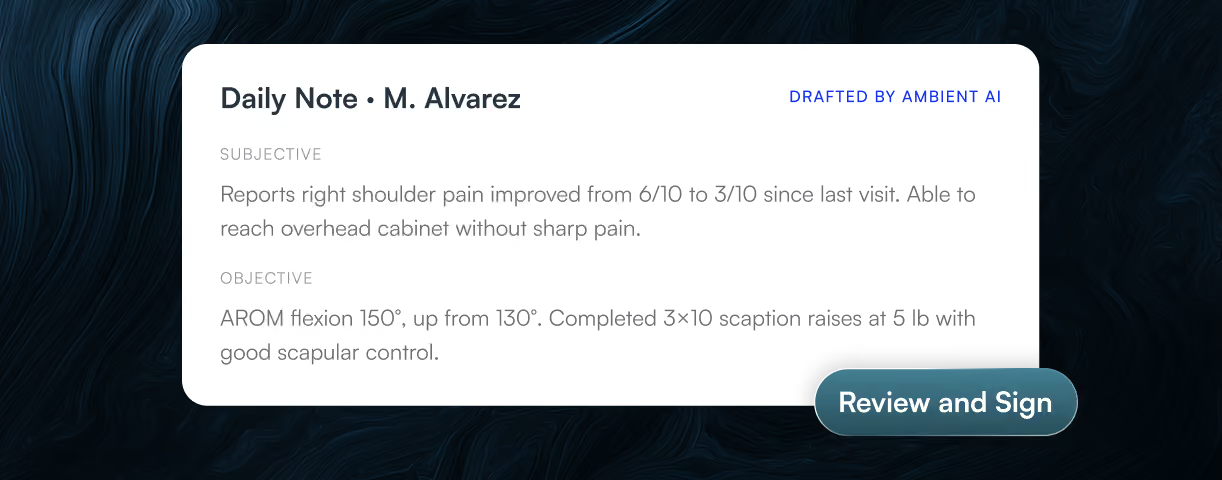
Ambient AI listens during the visit and drafts the complete note in your templates. Your providers review, edit, and sign between appointments. Nobody charts at the kitchen table.

Daily note screen showing an AI-drafted physical therapy progress note with shoulder pain improvement and options to edit or review and sign.

WHAT MOVES WITH YOU

Your data arrives connected, not just copied.

Patients

Demographics, contacts, and guarantors.

Insurance

Full details with policy holders and payer prioritization.

Cases

With diagnosis codes and referring providers.

Prior authorizations

Linked to cases, with authorization status tracked through go-live.

Your schedule

See what a day's caseload looks like from morning to close.

Clinical documents

Chart note PDFs and eDocs at the patient and case level.

Every migration includes record-count validation, patient-level checks, and a joint data review with your team before go-live. Your data is refreshed within 24 hours of the pilot start.

Three healthcare professionals look together on a laptop

WHAT CHANGES FOR YOUR TEAM

The same week, on two different systems.

YOUR WEEK ON WEBPT
YOUR WEEK ON AIR
Writing Notes
Typed by hand, often after the last patient has left.
Drafted by Ambient AI during the visit. Providers review, edit, and sign.
Your evenings
Charts follow providers home.
Notes are signed before they leave the building.
Finding answers
Report exports, portal logins, and waiting.
Any patient, case, or authorization is one search away.
Note templates
Rigid formats your team has learned to work around.
Ready on day one, in your existing template format.
Customizable on request.
Making a change
The fear of a months-long migration keeps you where you are.
A three-day pilot with your real data, before you sign anything.

The pilot covers documentation and scheduling. Billing and RCM are available after go-live.

PILOT SCOPE

Small enough to start this week. Real enough to trust.

PROVIDERS
1–5 providers

You choose who takes part; a champion clinician works best.

SCHEDULE DATA
1–3 dates of appointments

One recent past date plus one or two upcoming. Ambient AI is active on all live visits.

LOGINS
1–5 logins

Pilot provider, front desk, practice admin and owner profiles.

APPOINTMENT TYPES
Mapped 1:1 from WebPT

Mapped once through the setup guide. No reconfiguration needed.

NOTE TEMPLATES
Standard PT set

Initial Evaluation, Daily Note, Progress Note, and Discharge. Customizable on request.

AMBIENT AI
Standard prompting

Works out of the box. Can be tuned to your documentation style on request.

WHAT WE NEED FROM YOU

Three things, and about an afternoon of your time.

All three need to be in hand five business days before your start date. That window gives us time to extract, map, load, and verify your data without rushing any step. If an item is outstanding, the start date moves. We protect the setup window because it's what makes day one work.

Step 1

Sign the pilot agreement

A lightweight agreement that locks in your pilot start date.

Step 2

Complete the setup guide

A short form: your providers, appointment types, and preferences.

Step 3

Share WebPT access

Admin-level or reporting access, shared through a secure channel. This is how we extract your data for migration.

PROCESS & TIMELINE

Under two weeks, start to decision.

T-7
Quick check-in: we confirm everything is on track together
Athelas
T-5
All three items in: agreement signed, setup guide done, WebPT access shared
You + Athelas
T-5 → T-1
We extract, map, load, and verify your data, with nothing on your plate
Athelas
T-1
Short training session with your pilot team
You + Athelas
Day 0
A 30-minute kickoff, walking through your own migrated data live in Air
You + Athelas
Day 0–2
Providers document real visits with Ambient AI, and we check in daily
You + Athelas
Day 2
We review the success criteria together and you decide what's next
You + Athelas

WebPT keeps running while you try the better alternative.

Nothing about your current setup changes during the pilot. If Air doesn't win over your providers in three days, you've lost nothing but an afternoon.

We use cookies to improve your experience on our website. By clicking “Accept all’, you agree to the use of all cookies. View our Privacy Policy for more information.
Privacy Preference Center

When you visit websites, they may store or retrieve data in your browser. This storage is often necessary for the basic functionality of the website. The storage may be used for marketing, analytics, and personalization of the site, such as storing your preferences. Privacy is important to us, so you have the option of disabling certain types of storage that may not be necessary for the basic functioning of the website. Blocking categories may impact your experience on the website. More Infomartion

Essential (Always Active)

Cookies required to enable basic website functionality.

Thank you! Your submission has been received!
Oops! Something went wrong while submitting the form.