
Leave WebPT without starting over.
We move your patient history from WebPT into Athelas Air, run a free pilot on your own patients, and keep WebPT live until you decide. No credit card, and no disruption to the EHR you run today.
Read-only migration, so WebPT keeps running the whole time
Five business days, from your data in WebPT to your pilot in Air
Your history, connected, with cases, notes, and authorizations included


Plan my switch from WebPT
AI that fills the whole note, including measurements and flowsheets
Automated patient engagement, from scheduling and waitlists to reactivation
Easy migration from your EHR, so your patient history comes with you
Practices and Health Systems Running on Athelas
















.avif)







Why practices leave WebPT for Air
Ten differences, in the words of PT practices that switched.
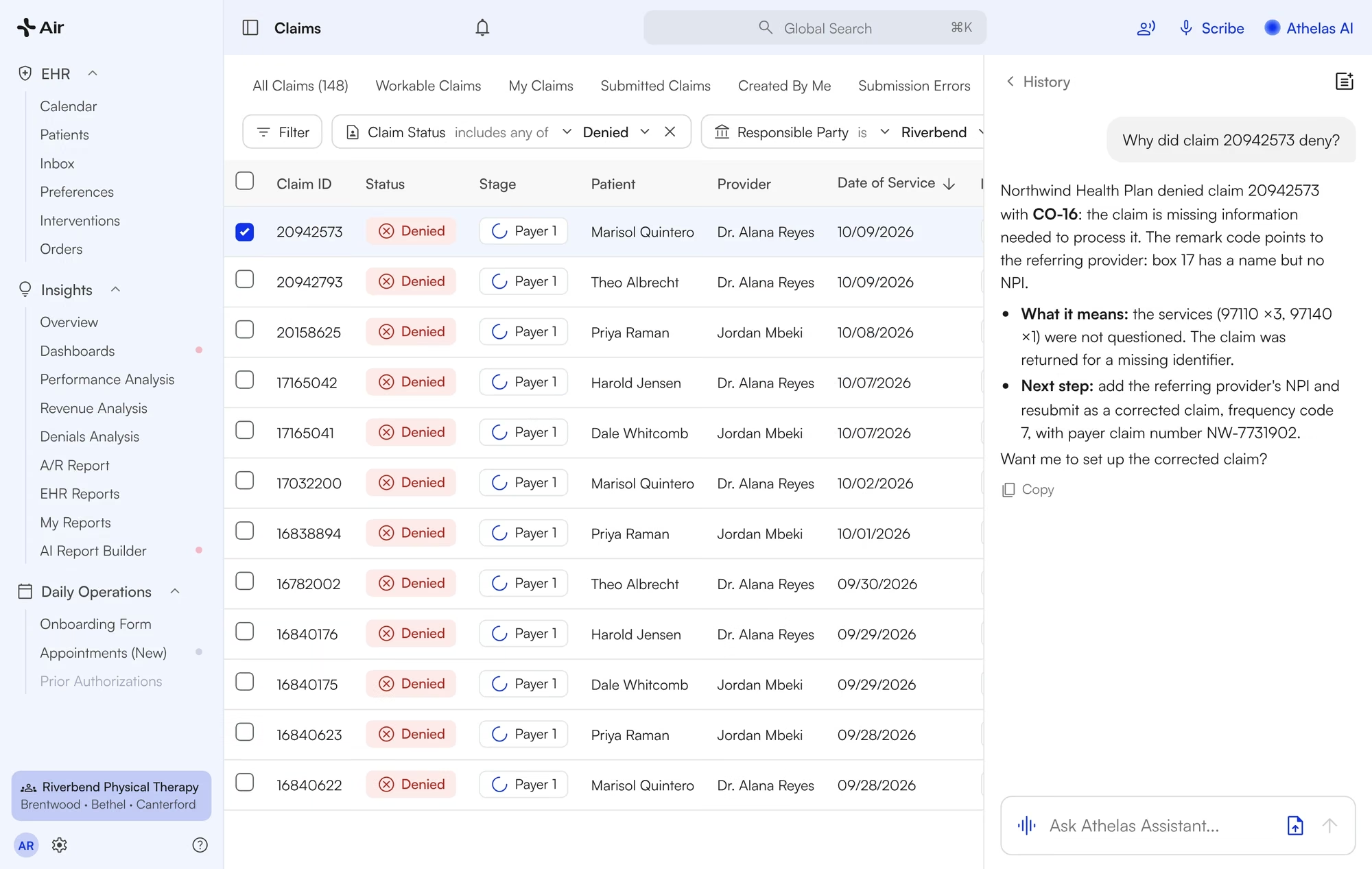
Claims go out clean, and denials surface in days.
Payer rules hold a claim before it ships. Denied claims land on a worklist with the reason explained and the corrected claim drafted.
Duplicate CPT codes blocked before the patient is billed
Each denial summarized with the next step
Corrected claims resubmitted in bulk
Paid in 12 days, not 45.
Evolution PT went from about 45 days to get paid on WebPT to 12 days from signed note to insurance payment.
“the husky denial for Medicaid was back from 2023. So that means that as of a year and a half later, [our old system] still has not caught that, and [Athelas] caught it within 40 days. So I appreciate this is, you know, why we switched.”
Mike Giunta · Evolution PT
EHR, Scribe, billing and front desk on one contract.
Scribe, eligibility, faxing, reminders, the waitlist and reporting come with Air. One login, one support team.
EHR and Scribe: notes, flowsheets, scheduling
Billing: claims, eligibility, payer rules, payments
Front desk: portal, waitlist, reminders, faxing
No add-ons, no second vendor.
WebPT practices told us the scribe and reminders were extra, and some ran WebPT Billing with full-time billers on top.
“…we had 3 full time billing folks on our team, and we were you know, [our all-in billing cost] was a huge expense.”
Amol Mehta · FYZICAL Lakewood Ranch
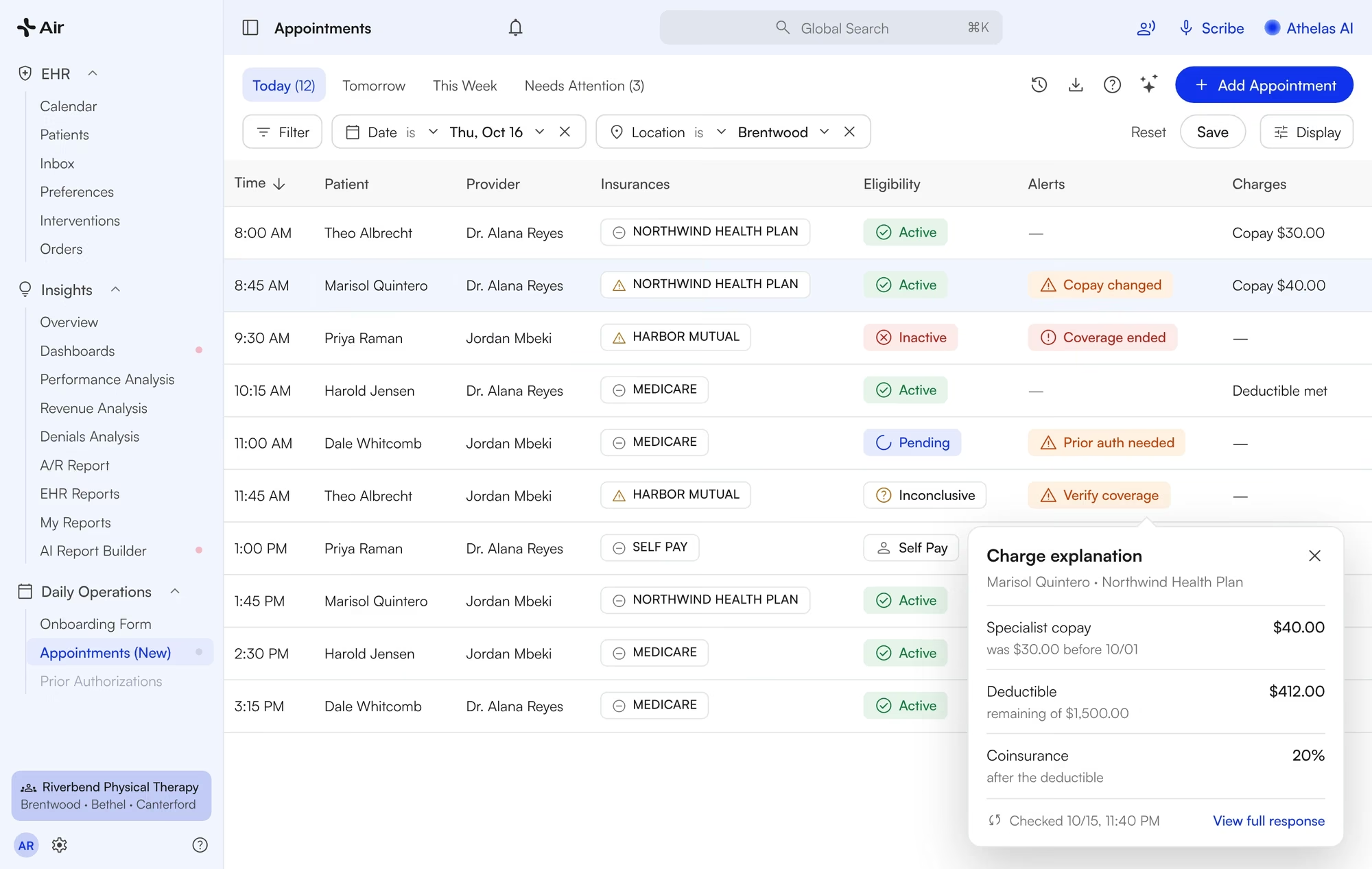
Every visit re-checked before the patient walks in.
Air runs eligibility for each appointment and flags inactive coverage, copay changes and prior-auth needs on today’s schedule.
Active, Inactive or Pending next to every visit
Copay, deductible and coinsurance one click away
Live check while the patient is still on the phone
No more asking every patient for their card.
WebPT practices told us they verified insurance by hand, usually only at the first visit.
“You you only do the [insurance] verification on our end for the first visit, unless they change insurances. So that’s kinda where you guys your system comes in more handy and that it’s rechecking it for each each visit.”
Brent Swartz · Innovative PT
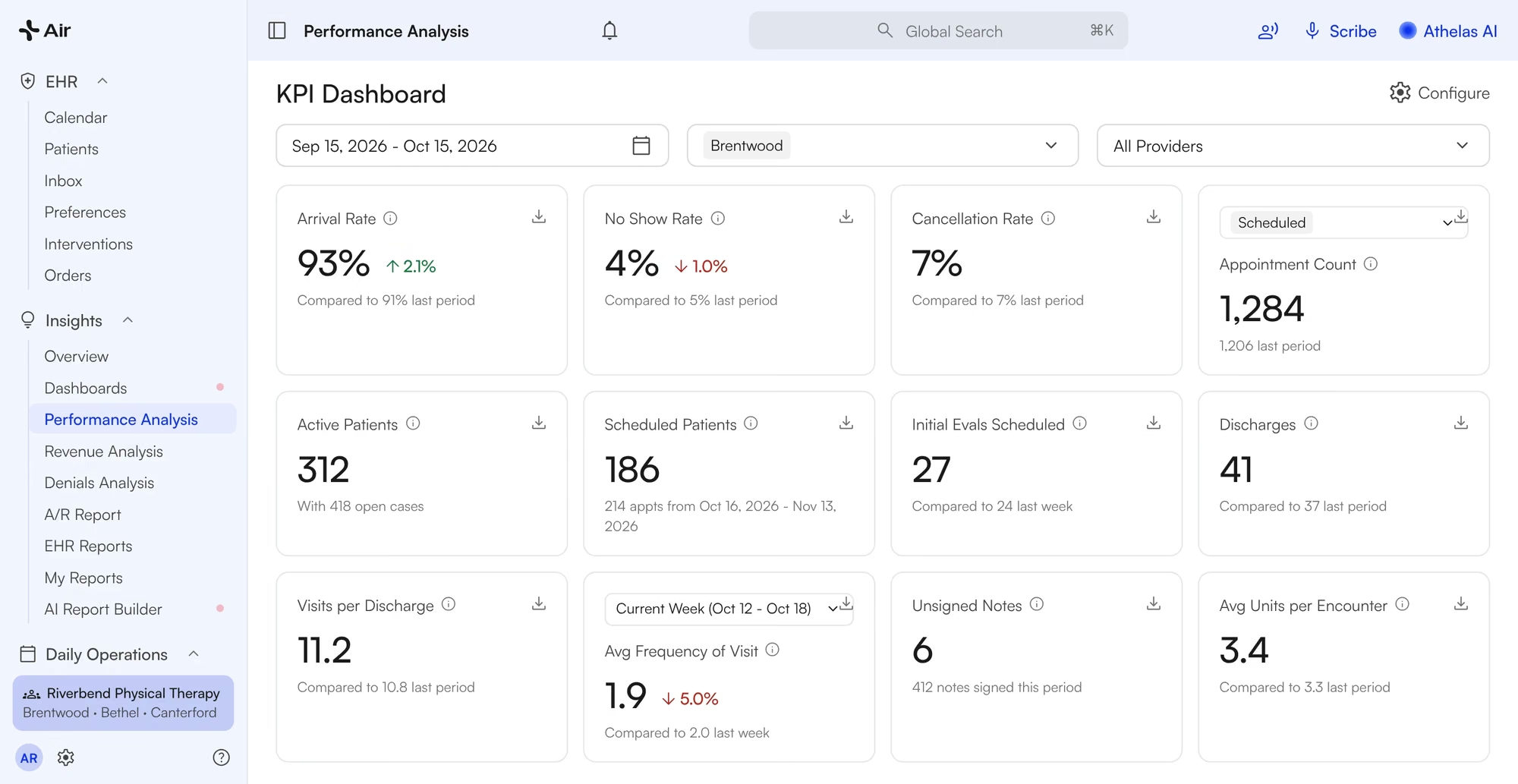
Every clinic on one live dashboard.
Arrivals, no-shows, cancellations, visits per discharge and units per encounter, by clinic and provider, refreshed daily.
Filter by clinic, provider and payer
Revenue per visit, payments and A/R aging
Build and save your own reports
No more pivot tables.
WebPT practices told us they ran reports one location at a time and rebuilt them in Excel.
“…the way I used to pull it from [our old system], I pulled it for all of them, and then I had to create a pivot table to then just select the handful that I wanted. So that [Athelas report] is fabulous for that one.”
Performance Rehab
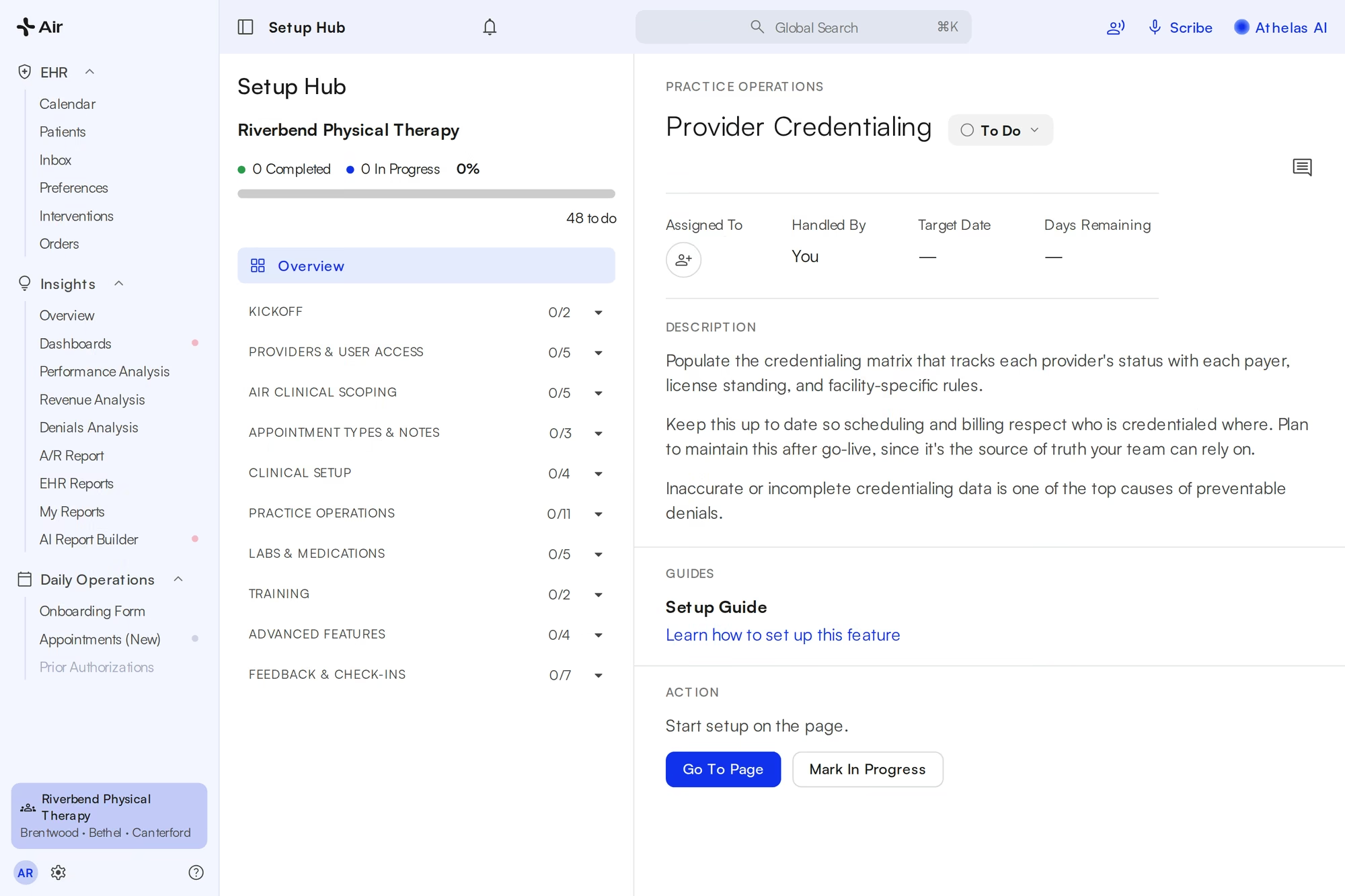
Set up in the app, with a team that answers.
A guided walkthrough inside Air takes your team through setup one step at a time, with a short guide and a link to the exact page for each task.
In-app guided walkthrough to set everything up
On-site help on go-live day
Settings you used to ticket for, you change yourself
No more waiting on WebPT.
WebPT practices told us the system went down mid-day, and routine changes meant going back and forth with support.
“[With our old EMR’s intake paperwork,] there was always it wouldn’t load or people couldn’t access it or it wouldn’t they would submit it and it never actually came through.”
The Physio Shop
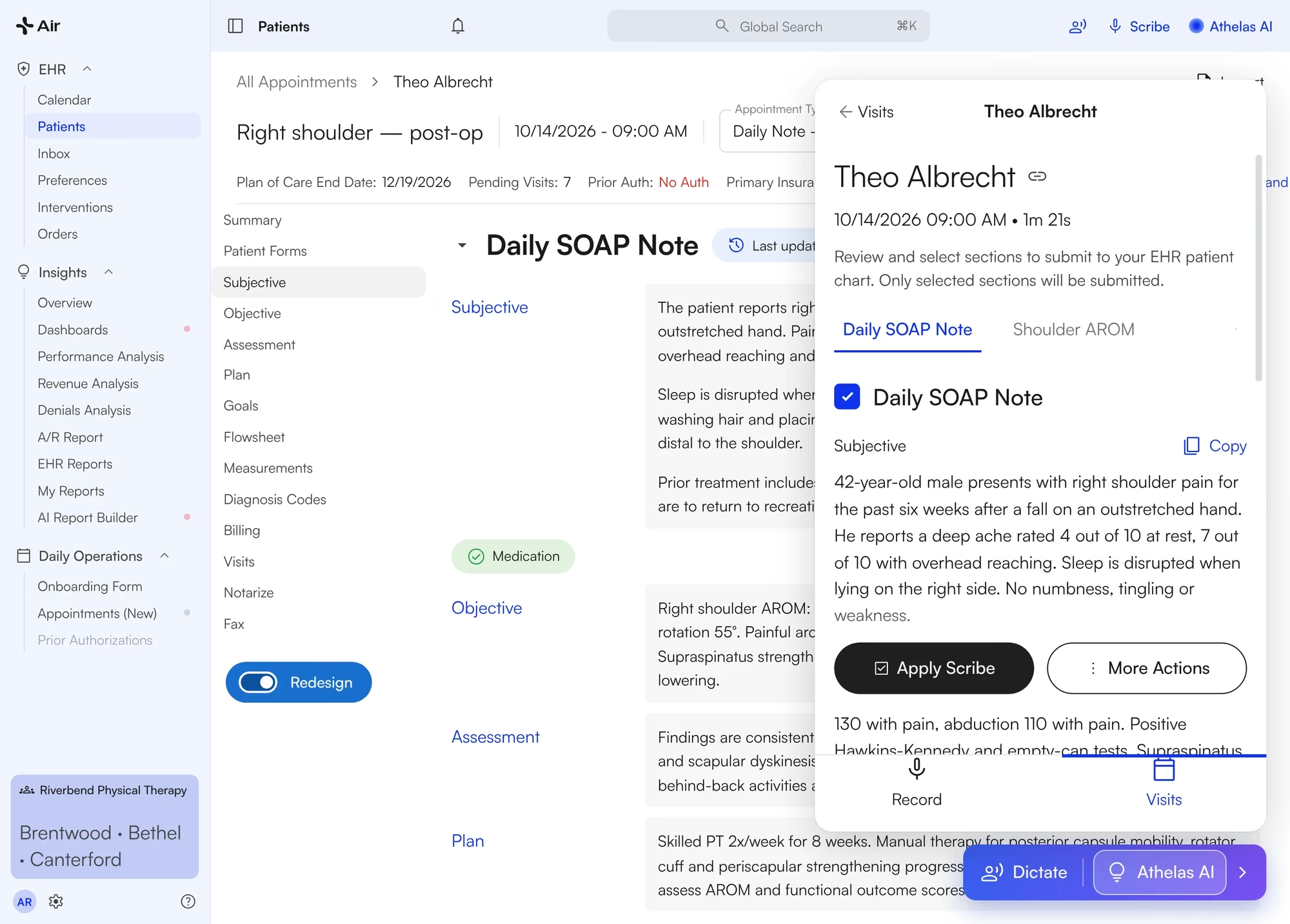
The whole note on one scroll, filled by Scribe.
Subjective through plan in one view, with the flowsheet inside the note and Scribe drafting from the visit.
Scribe drafts the note from the recorded visit
Flowsheet copies forward from the last visit
Open notes show up as soon as the patient checks in
No more tab-to-tab.
WebPT practices told us each SOAP section lived on its own tab, and some fields only showed after two clicks.
“So in [our old EMR], we [used to] have to switch from tab to tab to tab to go from subjective objective, assessment and plan.”
Stephanie Fano · Bushnell PT
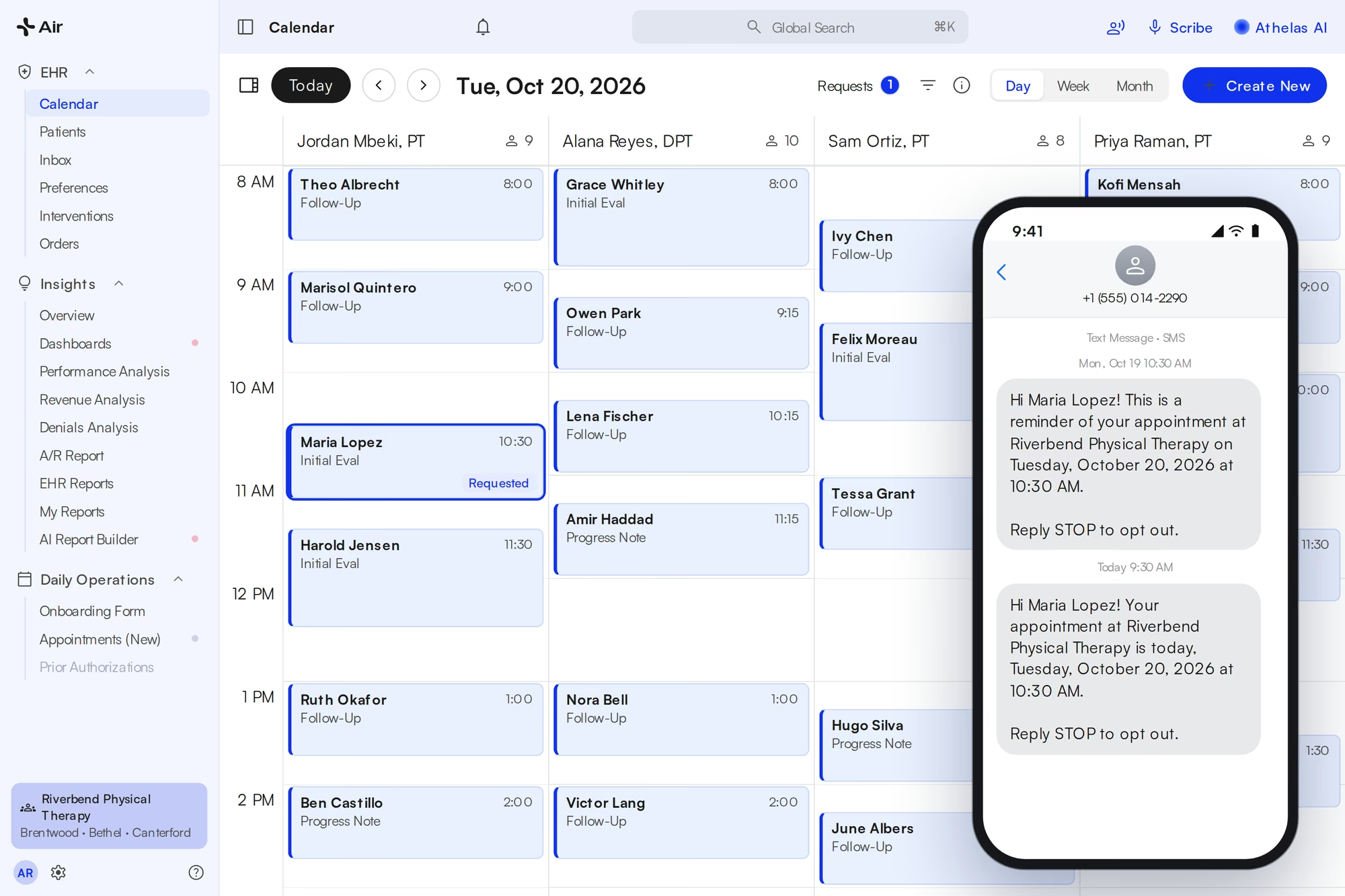
Patients book online, and reminders go out by text.
Share one booking link. Patients pick a provider, location and time, the request lands on your calendar, and reminder texts go out before the visit.
Your own booking link at portal.athelas.com
Portal requests show on the calendar
Reminder texts before every visit
Reminders without the add-on fee.
WebPT practices told us appointment reminders cost extra.
“[Our old EMR] is very much like nickels and dimes us for appointment reminders, and it’s a point of contention of mine with them.”
Brian Kracyla · Cloudline
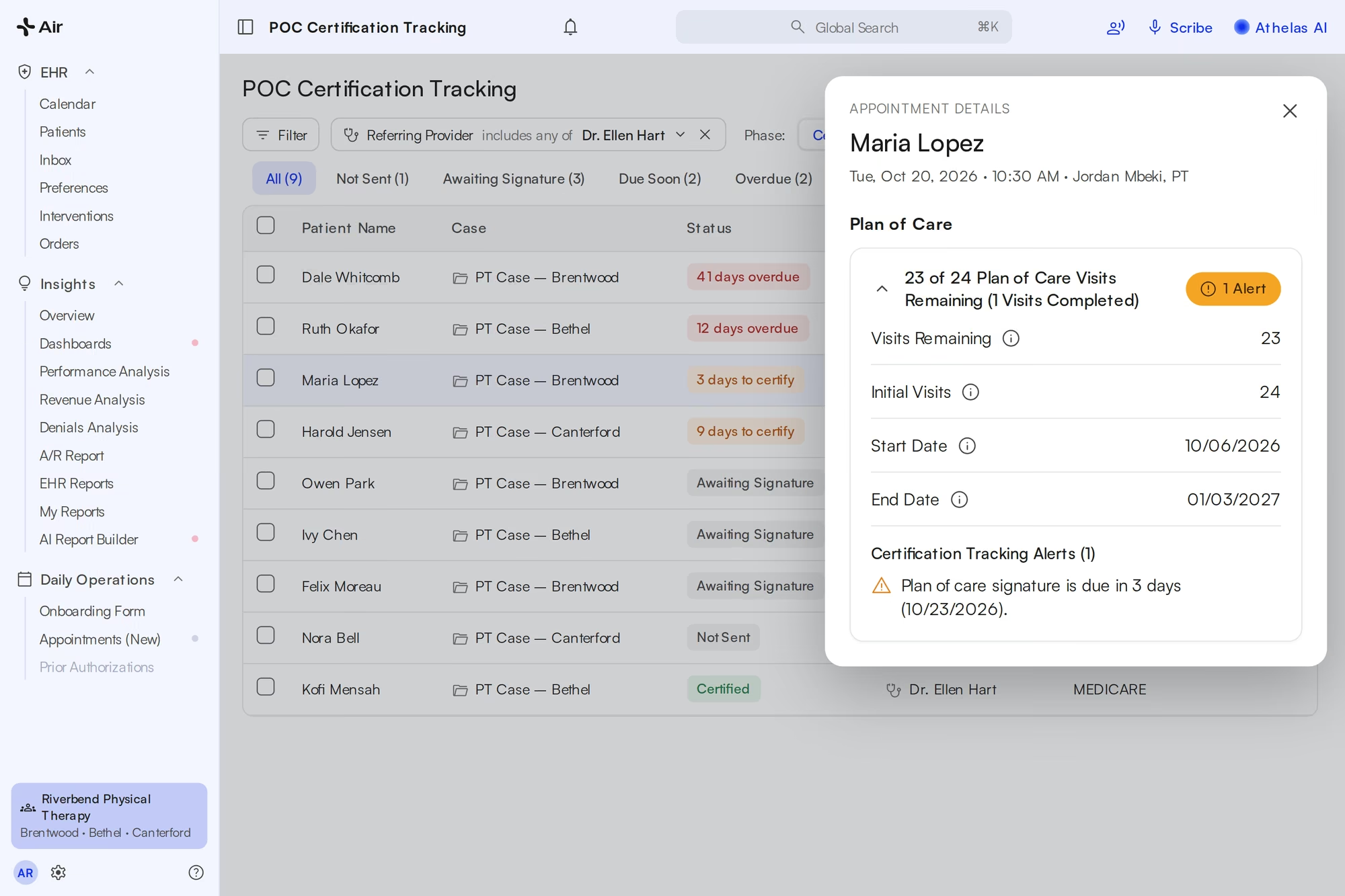
Plan-of-care dates and visits left, on every appointment.
Air counts plan-of-care visits as they’re scheduled, shows the end date on the appointment, and tracks every certification from sent to signed.
“23 of 24 Plan of Care Visits Remaining” on the appointment
Not Sent, Awaiting Signature, Due Soon, Overdue and Certified at a glance
Recertification alerts before the plan of care runs out
Counts that don’t wait for the note.
WebPT practices told us visit counts depended on completed notes, so they ran behind the schedule.
“So I think right now, [our current EMR], again, is not very accurate with [counting plan-of-care visits] because it’s note dependent. … With the new EHR that we’re switching to, it will count down per appointment scheduled.”
Patty Sauers · Jaguar / APEC
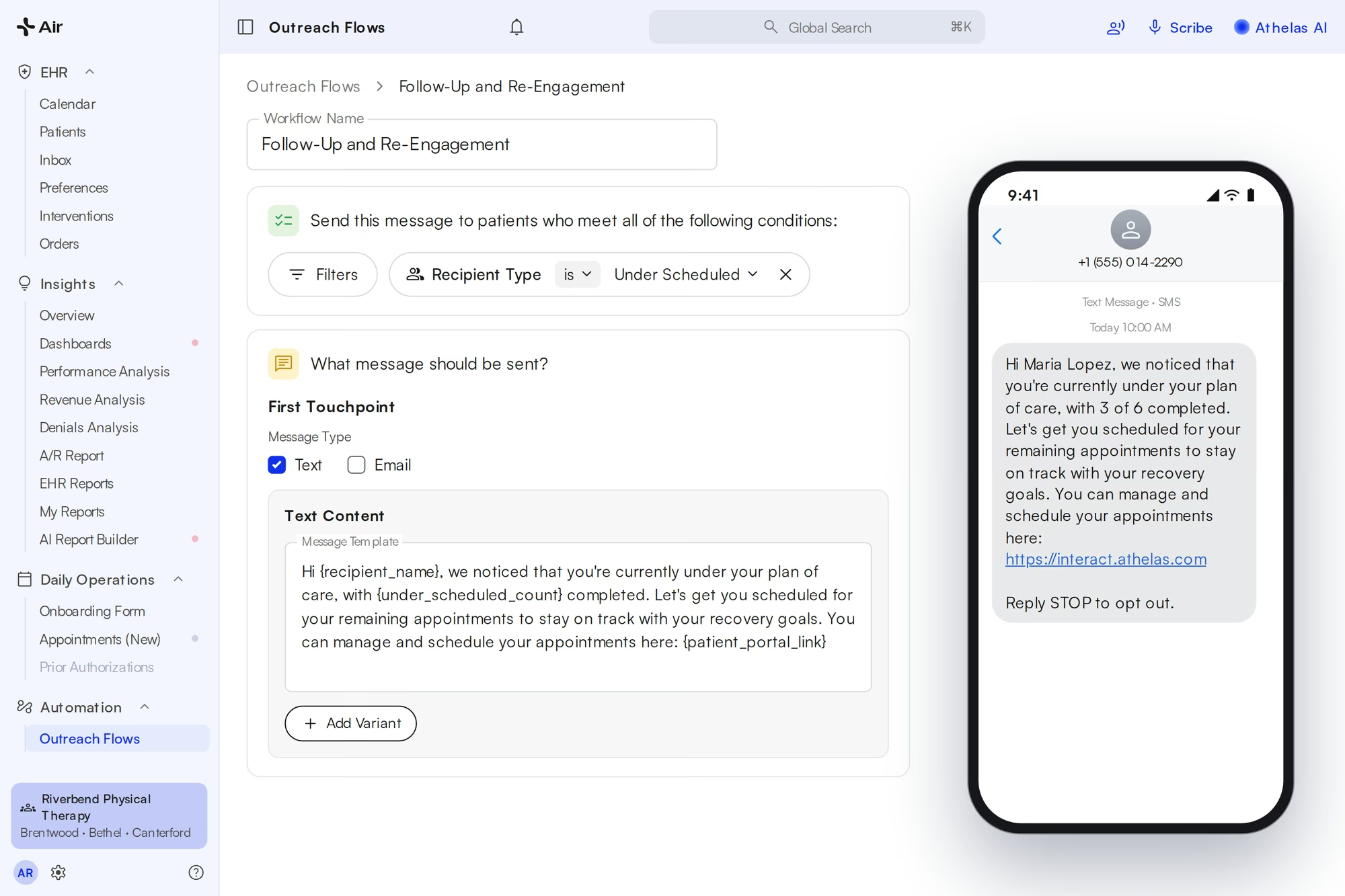
Patients behind on their plan of care get a text to book.
A recurring outreach flow finds patients scheduled below their plan-of-care frequency and texts them a link to book the rest.
Audience: Recipient Type is Under Scheduled
Sent on a schedule you set
Message shows visits completed and a booking link
Lost patients come back without a phone call.
WebPT practices told us their lost-patient list didn’t follow therapists across locations, so follow-up depended on someone remembering.
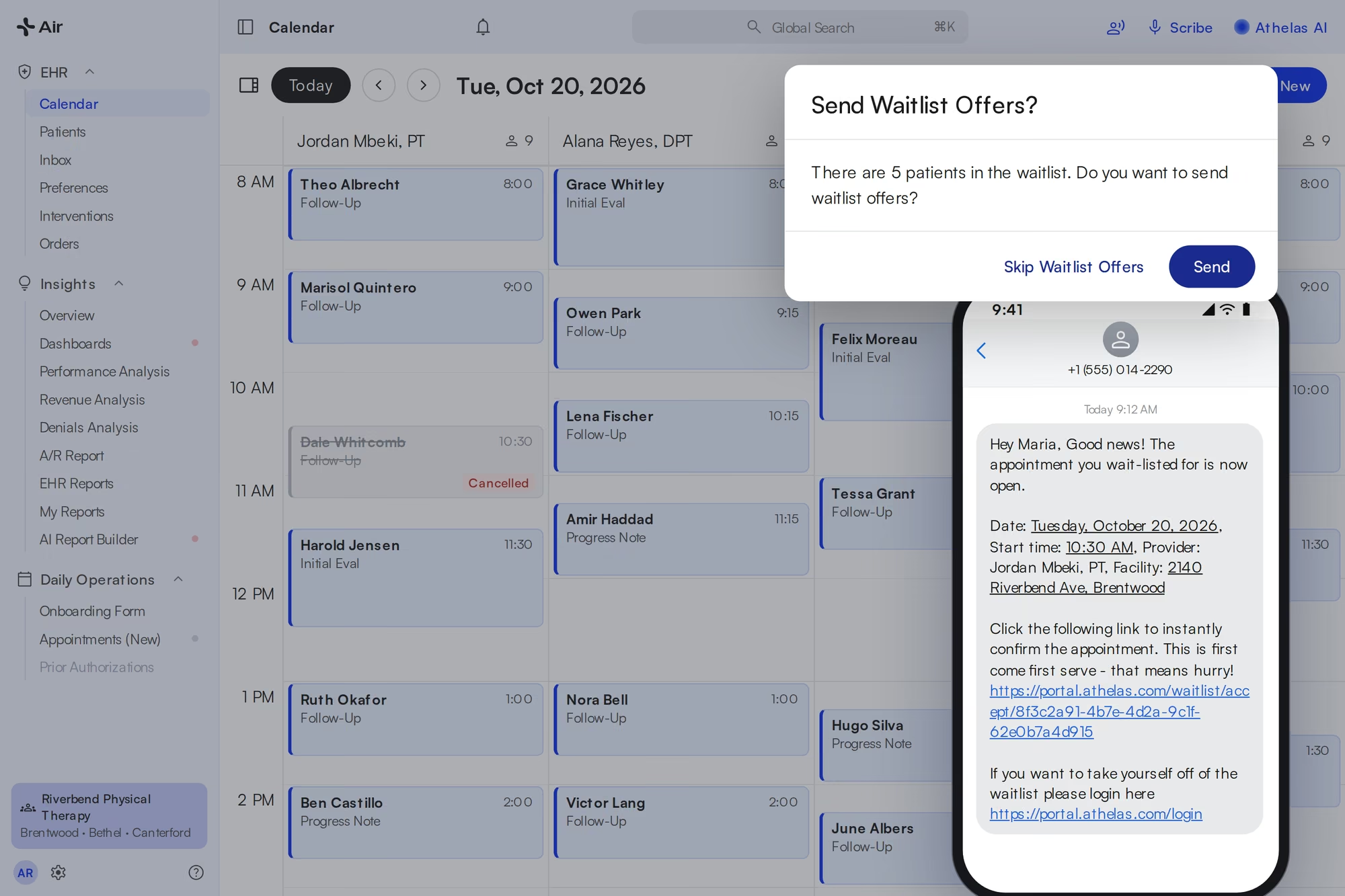
A cancellation fills itself from the waitlist.
When a patient cancels, Air asks whether to send offers. Matching waitlist patients get a text and an email, and the first to accept is booked.
Matched by provider, location and time
Offers go out in batches until someone accepts
Patients join the waitlist from the portal
A real waitlist, not a workaround.
WebPT practices told us they had to rig their own waitlist to fill open slots.
“it’s still really useful to use the waitlist, but it … [isn’t] quite as good as, like, a real person calling. But it’s a lot less work than a real person calling.”
Luke Gordon · Gordon PT

Athelas Air vs WebPT, at a glance.
What Air does, next to what WebPT switchers told us about the same thing.
Getting paid
12 days from signed note to payment at Evolution PT
On WebPT
About 45 days at the same practice
Vendors
EHR, Scribe, billing and front desk in one contract
On WebPT
Scribe and billing sold separately
Eligibility
Re-checked for every appointment, flagged on today’s schedule
On WebPT
Verified by hand, usually at the first visit
Reporting
One live dashboard across clinics
On WebPT
One location at a time, then Excel
Support
Guided in-app setup and on-site help at go-live
On WebPT
Downtime and back-and-forth with support
Notes
One scroll, filled by Scribe
On WebPT
Tab to tab for each SOAP section
Booking and reminders
Online booking link and reminder texts
On WebPT
Reminders billed as an add-on
Plan of care
Visits left and end date on every appointment
On WebPT
Counts depended on completed notes
Under-scheduled patients
Recurring texts with a booking link
On WebPT
Lost-patient list, per location
Waitlist
Cancellations trigger text and email offers
On WebPT
Practices rigged their own

Your WebPT history, in Air before day one.
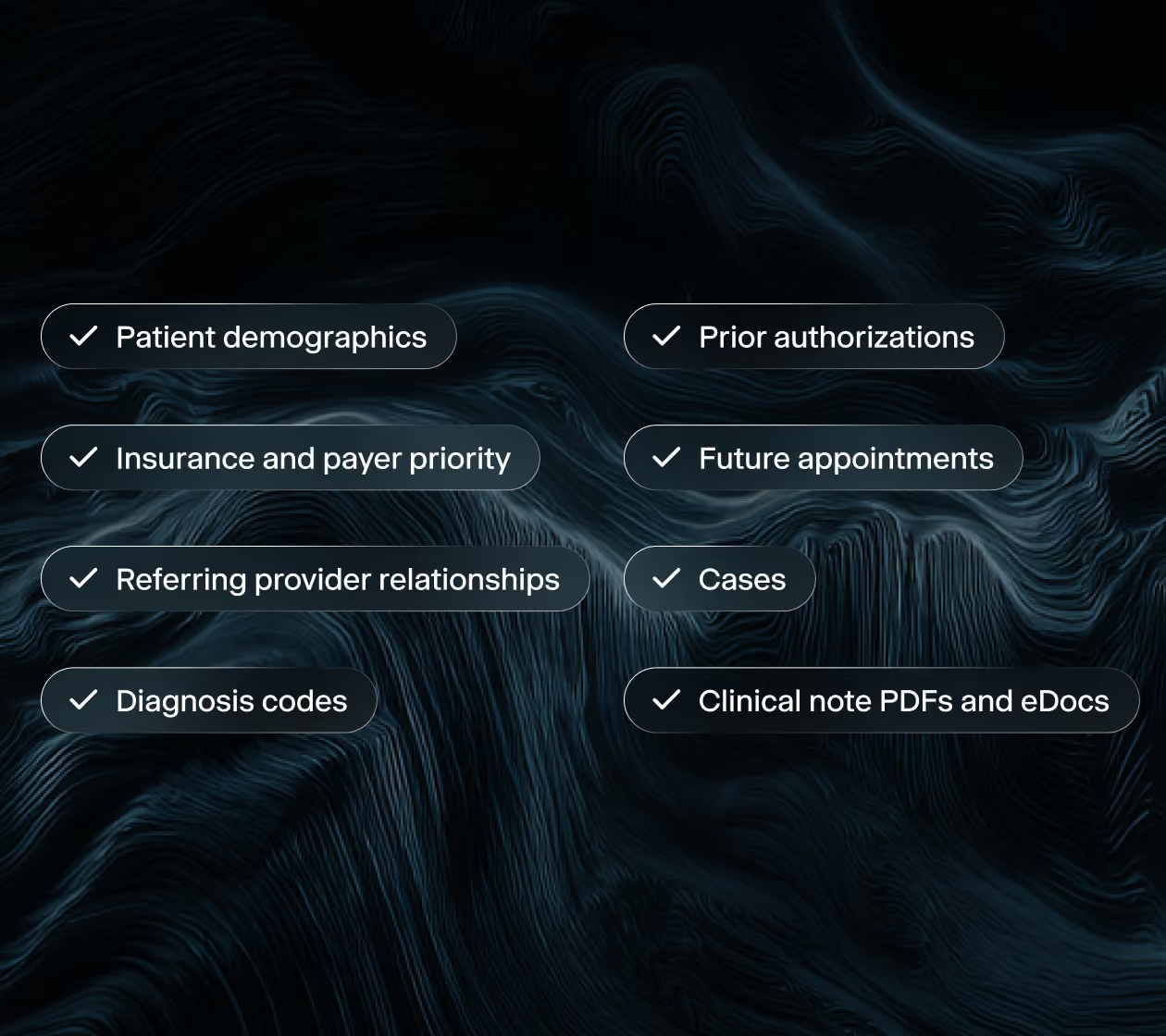
We extract your records from WebPT and map them into Air, so your team is not re-keying anything. Your providers log in to their own patients and schedule, not a sample account.

From WebPT to a live pilot in about a week.
Day 1
Scoping call
We confirm providers, locations, payers, and your start date, and note your WebPT renewal date.
Days 1–5
Migration and setup
We migrate your WebPT data, configure templates and payer rules, and set up EDI and ERA enrollments.
Day 5
Team training
Your team is trained the day before the pilot goes live, on your own patients.
Days 6–8
Pilot, then decide
Providers use Air on real visits with our team checking in. Then you keep it or walk away.
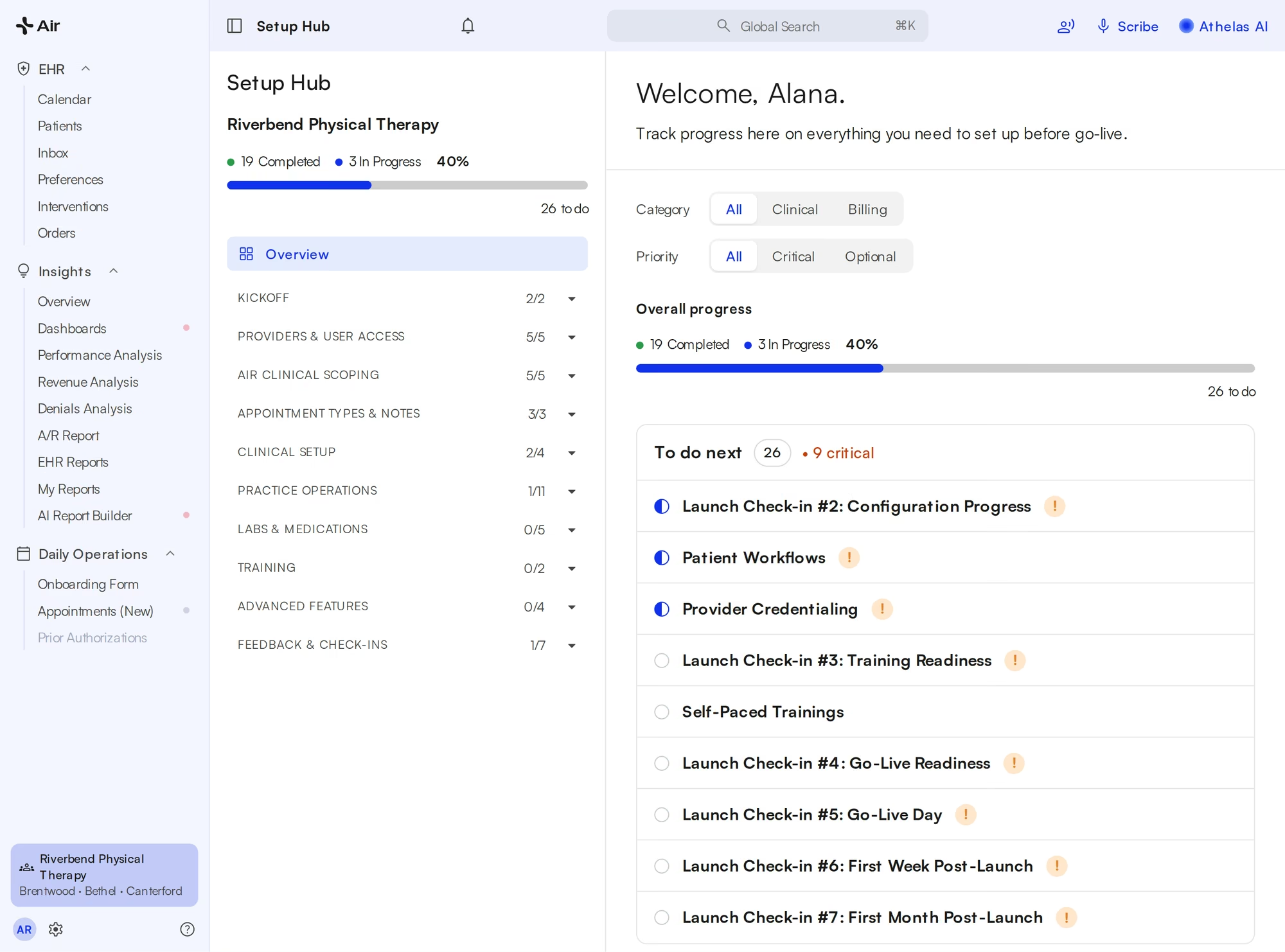

How the move went.

How the pilot works
Four steps, and most of the work is ours. WebPT stays live the whole time.
Apply
Tell us about your practice. A short scoping call sets the providers, the dates, and your start date.
We set it up
We migrate your WebPT data, configure your environment, and train your team the day before your pilot goes live. Five days, start to finish.
Pilot Starts
Your providers use Air with real patients for three days, with our team checking in alongside them.
Decide
Keep it, ask more questions, or walk away. We wrap up against the success criteria you set.

Questions before you leave WebPT.
Do I have to stop using WebPT during the pilot?
No. WebPT stays live and remains your system of record throughout the pilot, so nothing changes for scheduling, billing, or compliance. Air runs alongside it. Our migration reads from WebPT and never writes back to it.
What comes over from WebPT?
Demographics, insurance and payer priority, referring providers, diagnoses, prior authorizations, appointments, cases, and clinical notes. Record counts are matched block by block, and we walk through your own data with your team before go-live.
How long does the switch take?
To try Scribe on sample visits, we need your providers' email addresses and can have you set up within a day. To see your own patients and schedule live in Air, we need five business days to migrate your data from WebPT.
Will my clinicians have to relearn everything?
We train your team the day before the pilot starts, and our team checks in with your providers during it. The scribe fills measurements and flowsheets from the visit, so there is less to type than in WebPT.
What happens to our WebPT contract?
Share your WebPT renewal date on the scoping call. We plan the pilot and migration so you can decide with your own results before it renews.
Is the pilot really free?
Yes. The Athelas Air pilot is free, with no contract and no commitment to continue. You tell us about your practice on a short call, we set up your environment, and your providers try Air with real visits. At the end you decide whether to move forward.
Is my data secure?
Yes. Athelas Air is built on Commure's HIPAA and HITECH-aligned infrastructure, with AES-256 encryption at rest and TLS 1.2+ in transit. Patient data is hosted in US-based data centers with 24/7 intrusion monitoring, role-based access controls, and annual third-party penetration testing. Commure does not sell or share PHI, and your practice retains full ownership of its data.